
You say “I’m freezing, make it warmer and put some music on.”
Less than half a second after your last word, the thermostat is two degrees higher and the music is playing. Then the assistant tells you the new temperature. The number it says is the one your app actually set.
I built this last week as a demo for a pretend smart home. It uses two new OpenAI releases: GPT-Live and the Decisions API. This post explains how the pieces fit, for engineers who have never built a voice agent.
Two new pieces
There are three common ways to build a voice agent:
- Chained pipeline. Speech to text, text to a model, reply back to speech.
- Speech-to-speech. One model hears, reasons, calls tools and speaks. This is OpenAI’s Realtime API.
- Voice plus backend. One model talks. Something else does the work. This is GPT-Live.
GPT-Live only handles the conversation. From the getting started guide: “It can listen while speaking (full duplex). Sending work to the backend is called delegation.”
Live does not run your tools. It hands the request to a backend you pick at session start and keeps talking while the backend works. The voice agents guide sums up the split. Live is for “full-duplex conversations with a separate backend”. Realtime is for “speech, reasoning, and tool use in one session”.
The Decisions API is not a chat model. You send input and a list of questions. You get back one typed answer per question.
The Decisions guide has three question types:
| Type | Returns |
|---|---|
predicate | A probability that something is true |
choice | One of the values you listed |
score | A level on a rubric you define |
The guide says it answers “about 10x faster than the Responses API”. It’s in public beta, and gpt-6-luna is the only model.
That is why the two fit. Most voice commands are a pick from a short list. Lights on or off. Warmer or cooler. Billing, support, or a human. You need a fast classifier and a voice that keeps talking while it runs.
How one request flows
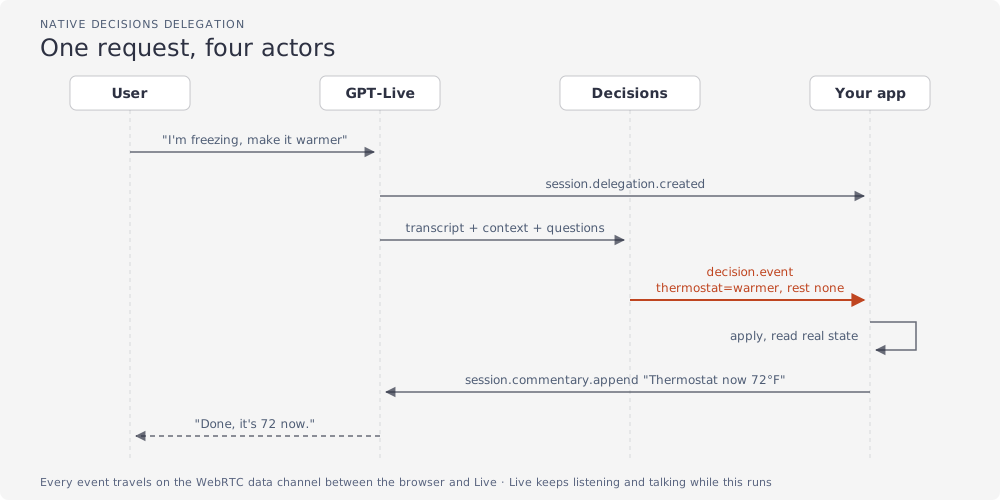
Four parts, one job each:
- Live talks. It decides when a request needs handling.
- Decisions picks. It answers every question from the transcript and your context.
- Your app acts. It applies the answers and reads back the real state.
- Live reports. Your app sends that state back, and Live says it in its own words.
Step 4 is easy to skip. Don’t.
Live never claims a change it was not told about. The only source of “it’s 72 now” is your code. If a real thermostat failed, Live would hear about the failure, not a guess.
The voice guide puts it this way: “The session instructions tell Live when to delegate. The choice questions tell Decisions what to return.”
Step 1: describe the session
Everything about the Live-to-Decisions link is set once, when the session starts:
const session = {
  model: "gpt-live-1",
  // How Live should behave, and when to hand work off
  instructions:
    "You are a warm, brief smart-home voice assistant. Delegate any request to change lights, brightness, thermostat or music. " +
    "Never claim a change happened until the app reports it; until then say a short filler like 'on it'.",
  // Who handles delegated work: here, Live calls Decisions itself with your questions
  delegation: { type: "decisions", decisions: { model: "gpt-6-luna", questions: delegationQuestions } },
  // Extra Decisions calls on every piece of the user's speech (step 4)
  triggers: [
    { type: "decisions", event_type: "session.input_transcript.delta", decisions: { questions: moodQuestions } },
  ],
};

// On your server: create the Live session with this config and your API key
The delegation mode is fixed for the whole session. To change it, start a new one.
How the audio gets there is a separate choice. The getting started guide lists WebRTC (the browser standard for live audio, recommended), WebSockets, and phone lines through partners like Twilio. My demo is a web page, so it uses WebRTC. The WebRTC guide walks through that setup.
The one rule that holds for every option: your server creates the session, so the API key never reaches the user’s device. In the guide’s words: “Keep the key and session configuration on your trusted server.”
After that, your app and Live talk through events:
| Event | Direction | Meaning |
|---|---|---|
session.input_transcript.delta | from Live | A piece of what the user said |
session.delegation.created | from Live | Live handed off a request |
decision.event | from Live | A Decisions result |
decision.item.create | to Live | Context for Decisions |
session.commentary.append | to Live | Something Live should say |
session.close / session.closed | both | End the session, get final usage |
Step 2: define your actions as data
Decide what the app can do before you handle any events.
I put every action in one table. Each entry is a question for Decisions plus the function that applies its answer:
const ACTIONS = [
  {
    name: "brightness",
    // What Decisions reads to choose an answer
    instructions:
      "Choose brighter or dimmer if the user wants the lights to stay on but at a different level. " +
      "Switching lights on or off is not a brightness change; choose none then. Otherwise none.",
    choices: ["brighter", "dimmer", "none"],
    // What your app runs for that answer
    apply: (state, choice) => ({ ...state, brightness: state.brightness + (choice === "brighter" ? 20 : -20) }),
  },
  // lights, thermostat, music
];

// The session's questions are built from this same table
const delegationQuestions = ACTIONS.map(({ name, instructions, choices }) => ({ type: "choice", name, instructions, choices }));
Why this shape:
- One source. Questions and handlers live together. A question can’t exist without its handler.
- A
nonechoice everywhere. It’s not a special API value, just a choice I added. The guide suggests the same: “Include a fallback option such as"other"when your categories don’t cover every possible input.” - One call, all answers. “Kill the lights and put some music on” returns
lights=off,music=play, andnonefor the rest.
The wording of the questions is your prompt engineering.
My first benchmark run scored 15 of 18. “Kill the lights” matched lights=off and also brightness=dimmer. One sentence fixed it: “switching lights on or off is not a brightness change; choose none then.”
The guide says to “separate different concerns into different questions, give choices distinct meanings”. In practice, no sentence should fit two boxes.
Step 3: apply the answers, report the truth
When Decisions finishes, a decision.event arrives with the answers. The app runs them through the same table:
// A Decisions result arrived
case "decision.event": {
  if (e.event.type !== "decision.completed") return; // ignore progress events
  if (e.delegation_id) applyAnswers(e.delegation_id, e.event.decision.answers); // answer to a user request
  else showMood(e); // a trigger result, see step 4
  break;
}

function applyAnswers(delegationId, answers) {
  // answers look like [{ name: "thermostat", choice: "warmer" }, { name: "music", choice: "none" }, …]
  const before = state;
  for (const action of ACTIONS) {
    const choice = answers.find((a) => a.name === action.name)?.choice;
    if (choice && choice !== "none") state = action.apply(state, choice); // run only real changes
  }

  if (state !== before) {
    pushState(); // tell Decisions the new state for the next request
    // tell Live what actually happened; it says this to the user in its own words
    commentary(delegationId, `Done. The home now reports: ${describe(state)}`);
  } else {
    commentary(delegationId, "No home setting matched that request; ask the user to clarify.");
  }
}
commentary sends session.commentary.append. Live “is trained to paraphrase the text” (delegation guide), so send facts, not a script. Each append holds up to 500 tokens.
Two related events:
session.thinking.appendfor facts Live should know but not say yet.session.instructions.appendto change how it behaves.
In the demo, apply just updates local state. In a real product, this is where you call the device, wait for it to confirm, and check permissions. The docs: “enforce permissions and required confirmations in application code.”
Decisions only knows what you tell it. Live sends it the transcript. It doesn’t know the room is at 72°F unless you add that as a context item with decision.item.create.
My demo deleted the old state item each time with decision.item.delete, which I didn’t find in the guides. The voice guide says to append a new snapshot instead: “Treat the newest snapshot as current. Keeping earlier inputs in place preserves the prefix for prompt caching.” Follow the docs here.
Step 4: detect mood while the user is still talking
Delegation waits for a complete request. Triggers don’t.
A trigger runs Decisions on every transcript fragment, separately from delegation. The demo uses one for mood detection: a single choice question, “Choose the mood of the user’s latest words”, with four answers (neutral, happy, frustrated, tired). The page shows the result as a mood indicator that updates while you speak.
It fired 11 to 14 times per sentence. Each result took 63 to 166 ms. “Why does my living room feel so stuffy? Ugh.” switched it to frustrated.
The same pattern works for sentiment, an avatar’s face, or an “escalate to a human” flag in a support call.
The trap: results can arrive out of order. From the voice guide: “Live can combine pending deltas, and results can arrive out of order.” So I number each fragment and drop results about older ones:
// Every piece of the user's speech gets a number in arrival order: 0, 1, 2, …
case "session.input_transcript.delta":
  fragmentNumber.set(e.event_id, fragmentNumber.size);
  break;

// A trigger result says which piece of speech it was about (source_event_id)
function showMood(e) {
  const n = fragmentNumber.get(e.source_event_id);
  if (n < newestShown) return; // about older speech than what's on screen: drop it
  newestShown = n;
  moodIndicator.show(e.event.decision.answers);
}
Wording matters here too. “I’m freezing” mostly came back neutral. I didn’t tune it.
Pick a delegation mode
You choose one per session:
| Mode | Config | Who decides | Use it when |
|---|---|---|---|
| Native Decisions | { type: "decisions", decisions: {…} } | Live calls Decisions | Fixed list of actions, lowest latency |
| Client | { type: "client" } | Your app | Rules, internal systems, or reviewing results first |
| Responses | { type: "responses", responses: {…} } | A model with tools | Search, writing, multi-step work |
I ran native and client side by side. Client mode had two costs:
- No transcript. The docs: “It does not contain the user’s utterance or task text.” You collect it from
session.input_transcript.deltayourself. - One more hop. Your app receives the delegation, calls Decisions, and waits for the answer before anything happens.
In my runs the timing didn’t clearly favor either mode. Live opened the delegation 363 ms after the last word in client mode, and anywhere from 4 to 419 ms in native mode. From delegation to answers, client took 151 ms (145 ms inside decisions.create) and native took 59 to 251 ms. Few runs, so treat these as ranges.
Client mode wins when some logic shouldn’t be a model. An order number or “cancel” needs a regex, not a classifier. Rules first, Decisions as fallback. This sketch is not in the demo, so it’s untested:
// session.delegation = { type: "client" }: Live tells your app, your app decides
case "session.delegation.created": {
  const said = lastUserTurn(); // you collect this yourself from transcript events
  const rule = RULES.find(([pattern]) => pattern.test(said));
  if (rule) {
    // exact match: no model call, instant and free
    state = rule.apply(state);
    commentary(e.delegation.id, `Done: ${describe(state)}`);
  } else {
    // anything else: ask Decisions from your server, then apply answers as in step 3
    await decideOnServer(e.delegation.id, said);
  }
}
Decisions can also route to a text model. My demo has an explain question. For “why does my living room feel so stuffy?”, Decisions picks explain, the app asks the Responses API for one sentence, and sends it back as commentary. The voice guide describes this pattern: Decisions decides “whether your app should call the Responses API.”
What the numbers say
Is Decisions fast because of the model or the endpoint? I tested it.
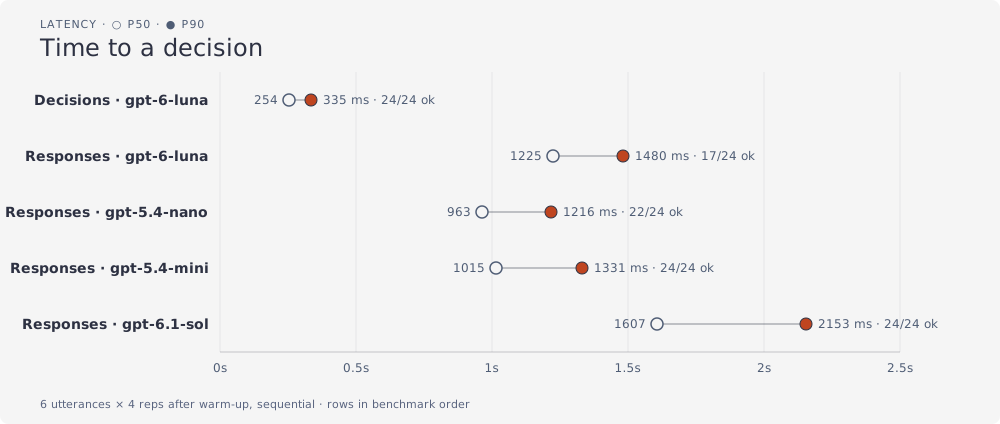
Setup: six hand-written sentences, the same five questions. Decisions got them as choice questions, Responses as strict function tools. Four runs each after a warm-up, one request at a time, from a laptop in the EU.
| Path | p50 | p90 | Correct | $ per decision |
|---|---|---|---|---|
Decisions, gpt-6-luna | 254 ms | 335 ms | 24/24 | $0.000066 |
Responses, gpt-6-luna | 1,225 ms | 1,480 ms | 17/24 | $0.000045 |
Responses, gpt-5.4-nano | 963 ms | 1,216 ms | 22/24 | $0.000100 |
Responses, gpt-5.4-mini | 1,015 ms | 1,331 ms | 24/24 | $0.000361 |
Responses, gpt-6.1-sol | 1,607 ms | 2,153 ms | 24/24 | $0.000892 |
The speed comes from the endpoint. Row two is the same model through function calling. It was 4.8 times slower at p50. The docs say “about 10x”. I measured less, on my questions and my network.
Every Decisions call reported zero output tokens. That fits “pick, don’t write”, but it’s my inference. The docs don’t say it.
Read the accuracy column carefully:
- The same small model scored 24/24 through Decisions and 17/24 through function calling.
- Bigger models through Responses also scored 24/24. They took one to two seconds.
- With 24 samples per row, each p90 rests on about three data points.
Decisions answers can also include a confidence and per-choice probabilities. The direct endpoint documents both.
In one test, “stop that noise” returned music=pause, the right answer, at confidence 0.28. Function calling gives you no such number. With it, you can ask the user to confirm instead of acting. The docs say to set thresholds “based on the cost of false positives and false negatives”, using your own labeled examples.
The voice guide’s decision.event examples show only the answers. Check what your session actually receives.
Now cost. GPT-Live is $0.05 per minute, billed per second, silence included (model page). Decisions charges input tokens only, $0.10 per million.
| Conversation | Voice | Triggers | Decisions | Responses | Total |
|---|---|---|---|---|---|
| ”freezing… warmer… music” (20 s) | $0.0167 | $0.000245 | $0.000072 | none | $0.0170 |
| ”why so stuffy?” (24 s) | $0.0200 | $0.000224 | $0.000070 | $0.000456 | $0.0207 |
Voice was about 97% of both bills. Per call, Decisions wasn’t even the cheapest. Responses with the same model cost less.
Risks before you ship
- Beta APIs. Decisions is in public beta, and the docs are still catching up. Pin versions and expect changes.
- A fixed list is a limit. Anything outside your choices gets
none. That’s safer than an invented tool call, but someone has to maintain the list. More questions, more overlap. - Transcripts make mistakes. The session guide: “a transcript fragment is not a complete user turn, and transcripts may contain mistakes.” Decisions sees them too. Gate risky actions on confidence or confirmation.
- State belongs on your server. Long sessions summarize old context. The docs say to keep “important facts, confirmed actions, and current task state in your application”. My demo kept state in the browser. Fine for a demo, wrong for production.
- Lock down session creation. Anyone who can start a session spends your money at $0.05 a minute. The WebRTC guide asks for authentication, authorization, request limits and HTTPS. My demo only checked the origin.
- Billing starts at creation. A WebRTC session bills 15 seconds up front, credited back once it runs. Don’t create sessions early. Send
session.closeand wait forsession.closed, or you never see final usage.
What I didn’t test: interruptions mid-action, several requests at once, noisy audio, non-English speech.
I also didn’t measure the Realtime API. My numbers compare Decisions with function calling for fixed-choice actions. They say nothing about one speech-to-speech model with some filler speech.
When to use this
Use Live with native Decisions when actions are a known list and the change should land as the user stops talking. Device controls, kiosks, call routing, flags during support calls.
Put exact matches in rules. Send open-ended work to Responses. Let Decisions decide which.
Before you commit, run your own version of my benchmark. Six sentences from your domain, your questions, both APIs, four runs each. Your numbers will tell you more than mine.
Let the voice talk. Let a list decide. Let your code tell the truth.